-
STEP 1: How the Outcome of interest changes over time
8 Lessons-
StartSTEP 1: slide-show and PDF
-
PreviewStep 1: Specify the Outcome of interest
-
Start1a: Add a Variable for the Outcome of interest
-
StartThe Variable's settings explained
-
StartMore on the 2 time-series throughout the model
-
StartCopy Actual values in from a spreadsheet
-
Start1b: Add a results Chart
-
Preview1c: Create a Scenario
-
-
STEP 2: "Stocks" drive the changing Outcome
12 Lessons-
StartSTEP 2: slide-show and PDF
-
PreviewThe rationale for Step 2 – and how it works for the crime case
-
Start2a: Add a Stock of criminals to the model – and crimes per criminal
-
Start2b: Link items for calculating
-
Start2c Explore sensitivities of model results
-
Start2d: How Stocks must change to get the Preferred outcome (1 of 2)
-
StartFind more Stocks driving performance
-
Start2e: Add a Stock of Officers to the model + test sensitivities
-
Start'Look up' how Officers' time affects the criminals' crime-rate
-
Start2f: Add a Lookup function to the model for the impact of officers' time
-
Preview2g: How Stocks must change to get Preferred outcome (2 of 2)
-
Start2h Add Notes to document your models
-
-
STEP 3: Flows change the Stocks
8 Lessons-
StartSTEP 3: slide-show and PDF
-
PreviewHow Flows fill and drain Stocks
-
Start3a: Add Flows of Criminals and Officers to the model
-
PreviewThe Stock-and-Flow framework and 'bath-tub' metaphor
-
Start3b: Explore the Flow-rates needed for the Preferred outcome
-
StartHow Stock-Flow numbers work + a spreadsheet equivalent
-
StartStocks and Flows for other cases
-
PreviewWhy is this an "agile" approach?
-
-
STEP 4: Stocks and Decisions drive Flow rates
11 Lessons-
StartSTEP 4: slide-show and PDF
-
PreviewStep 4: Stocks and Decisions drive Flow rates
-
StartHow limited potential Stocks slow Flow rates
-
Start4a: Add a limited potential Stock to the model
-
StartHow existing Stocks drive Flows
-
Start4b: Add to the model Officers driving Flows of criminals
-
Start4c: Decisions drive Flow rates (and in the model )
-
Start4d: When Stocks drive their own Flows (and in the model}
-
Start4e: New Stocks also drive Flows (and in the model}
-
StartExplore Decisions to achieve the Preferred outcome
-
StartTest extreme values
-
Build a system dynamics model - the agile way
A fast, reliable 4-step process
There are many kinds of "model" for tackling complex issues concerning social, environmental, economic and business issues. But only dynamic models can match the quantitative behaviour of real-world systems – explaining why the present situation arose, where it will likely go in future, and how to improve the outcome.
Why is that useful? Because at some point we have to make decisions – not only about what to do, but also how much, and how those choices must change over time.
And that is what system dynamics models can do for you. This course gives you the simplest-possible tools, and the simplest-possible process for building these powerful models.
The free preview lessons below explain more.
Is this course for you? This is a skill that every analyst, consultant and accountant needs. It is easier than building a spreadsheet model – and way more fun!
In 2+ hours of video and over 100 slides, the course:
... explains in detail the rigorous, reliable 4-step process for building any system dynamics model
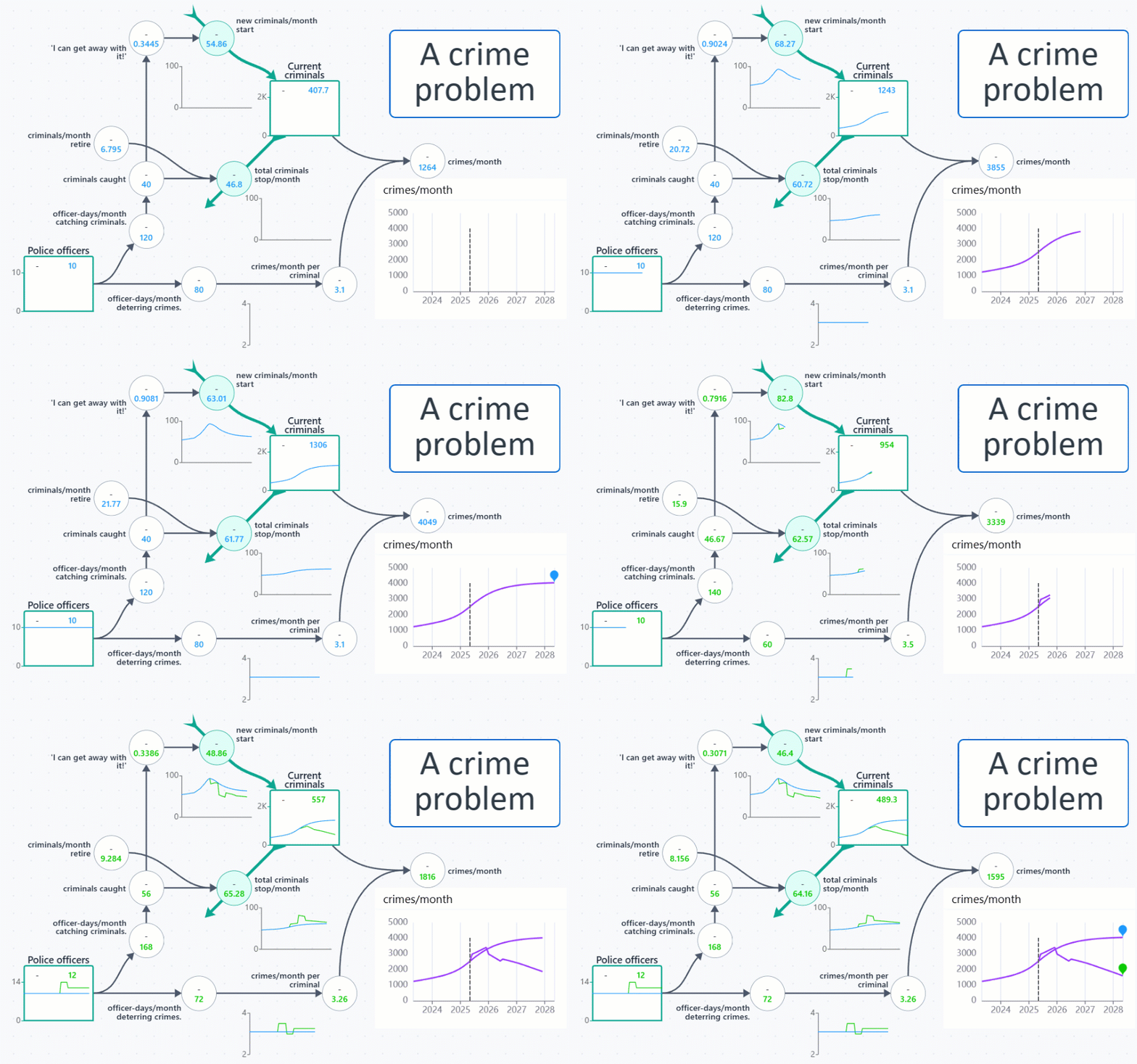
... gives you step-by-step instructions for building a complete working model of a simple case (reversing the growth of a certain type of crimes in a city)
... provides a series of working models in the easy-to-use (and free!) Silico modeling webapp, for you to check your own model at each step.
In the process, you will learn many tips and tricks for building system dynamics models of your own.
What is this short course about?
See this short explanation here >>>
... and check out the free preview lessons below.
Course Curriculum

Kim Warren
Kim is an experienced strategy professional, teacher and publisher of online courses and teaching resources on business modeling – fast becoming a main-stream capability for executives, consultants and business students. He also offers resources to help model non-business challenges, notably in health-care and international aid.
After senior corporate strategy roles, Kim joined London Business School, to teach on MBA and Executive programs. To overcome serious limitations with standard strategy methods, he developed the powerful strategy dynamics modelling method for designing and managing strategy for any organisation or challenge. Once a specialist skill, building these simulations is now easier, faster and more reliable than spreadsheet modeling. Such models mimic real-world behaviour and performance of businesses and other organisations with uncanny realism.
Kim is author of the prize-winning Competitive Strategy Dynamics (Wiley, 2002), a major strategy textbook Strategic Management Dynamics (Wiley, 2008), and summary e-book now widely used in MBA and executive teaching – Strategy Dynamics Essentials (Kindle, 2011). He is also co-founder of Strategy Dynamics Ltd, which publishes "serious games" and online courses exploiting the user-friendly modelling application, Silico.